Pulse InvScanner - 6-Step Mobile Scanning Workflow
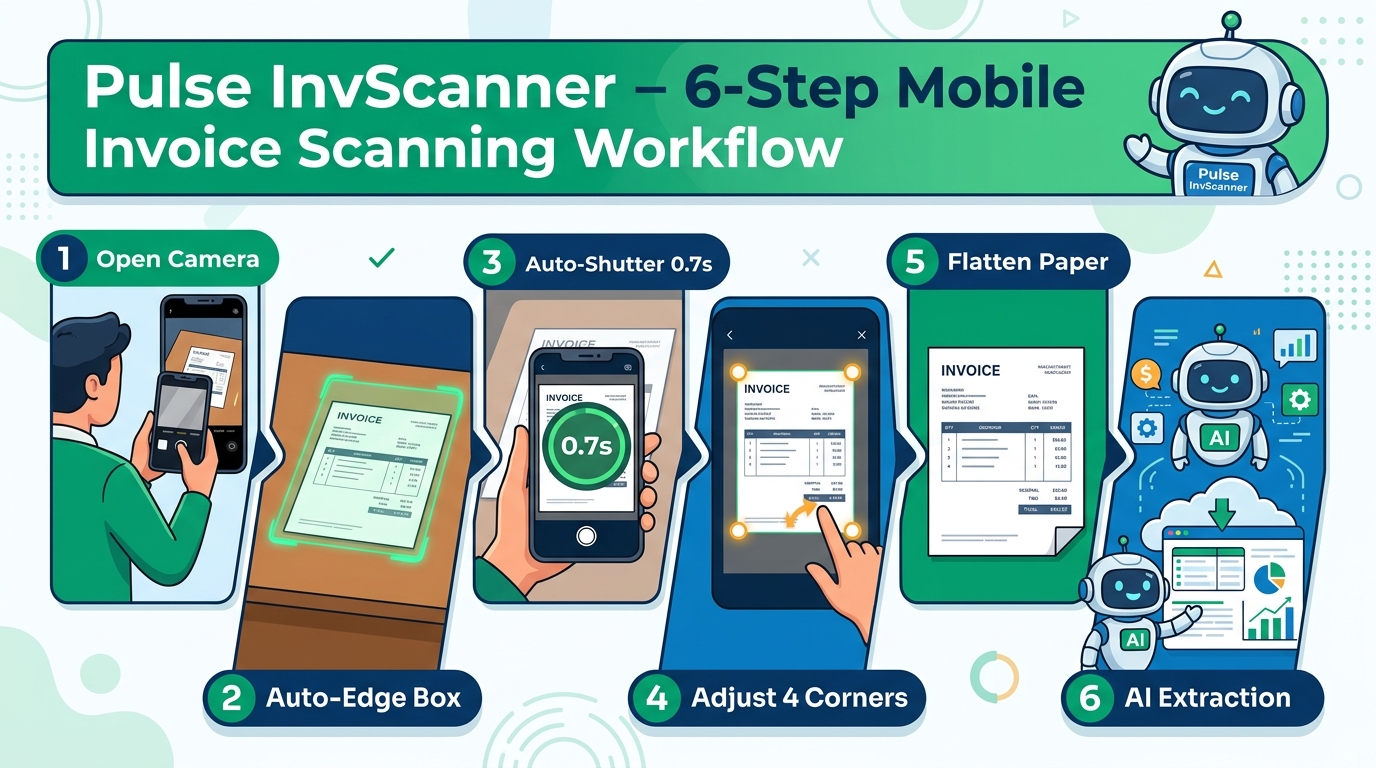
A friendly cartoon infographic illustrating the smart mobile document scanning lifecycle: from camera launch and auto-capture to 4-corner adjustment and Pulse AI extraction.
Workflow Analysis: Is Your Proposed Sequence Correct?
The verdict is "Almost 100% accurate!" There is only one key sequence distinction between "Capture Picture" and "Adjust Edge Paper": In real-world operation, users cannot drag paper corners while live video is in motion. Thus, the system runs Real-Time Auto-Edge tracking (green box) ➔ Snaps photo (0.7s hold-still) ➔ Enters Preview Mode ➔ User drags the 4 corner pins with 100% precision on the still frame!
🚀 Actual Step-by-Step Workflow
Step-by-Step1. Open Smart Camera
Tap "Open Smart Camera" on your smartphone. Opens a crystal-clear 1080p fullscreen viewfinder equipped with a flashlight toggle (Torch) and camera-flip button.
2. Focus & Auto-Edge Box
Point your camera at the receipt. The boundary detection engine projects a glowing green quadrilateral frame that latches onto document edges in real time.
3. Auto-Shutter Capture (0.7s)
Hold steady for 0.7 seconds. The circular green gauge fills up and automatically snaps the photo with a gentle shutter beep and vibration—eliminating button jitter.
4. Preview & Adjust 4 Corners
The high-res still frame freezes on screen with 4 draggable corner pins. Drag any pin to fit the paper, or tap "Auto-Fit" for instant centering.
5. Flatten & Batch Queue
Homography perspective warping straightens angles into a flatbed-quality document, queuing it into Batch Scanner so you can snap more receipts consecutively.
6. Pulse AI Extraction
Tap "Process Queue". The Pulse AI Engine extracts vendor name, 13-digit Tax ID, dates, subtotal, VAT 7%, and line items into the digital ledger.
📊 Process Verification Table
InvScanner Process| Step | Your Initial Description | Actual System Workflow | Verification Status |
|---|---|---|---|
| 1 | Open mobile scan | Opens fullscreen 1080p Smart Camera | ✅ Correct |
| 2 | Focus on invoice | Aims at paper with real-time green boundary box | ✅ Correct |
| 3 | Adjust edge paper | 📸 Capture happens first (0.7s stillness or shutter tap) | 🔄 Inverted Sequence |
| 4 | Capture picture | 📐 Review Screen & Drag 4 Corner Pins (Preview & fine-tune) | 🔄 Inverted Sequence |
| 5 | Preview picture | Perspective straightens & queues in Batch Desk | ✅ Correct |
| 6 | Send to AI for extract data | Sent to Pulse AI Engine for automated accounting extraction | ✅ Correct |